
How MeetMi compares with other AI note takers
Updated
MeetMi is an AI meeting assistant for Mac and iPhone that transcribes on your own device, with no bot in the call and no audio kept, and gives you short suggestions while people are still talking. It suits people who want help during the meeting as well as notes at the end, and who can do without speaker names, audio recordings and a team workspace.
Facts about Otter, Fireflies and Granola come from each company’s own website and help pages, read on 26 September 2026. We make MeetMi and haven’t tested the other three; each does things MeetMi doesn’t, as the last section shows.
How do AI meeting tools differ?
These seven questions cover the main differences.
Does a bot join the call, or does the app listen on your device?
MeetMi never joins the call: on a Mac it hears whatever the Mac plays plus your microphone, and on iPhone it listens through the microphone. Granola has no meeting bot at all; for Otter and Fireflies the bot is optional.
More detail: how MeetMi listens, and the others’ bots
On a Mac, MeetMi hears whatever the Mac plays, whichever app it comes from, so there is nothing to install in the meeting app. Because it hears the Mac’s whole audio mix, other sounds playing at the same time, such as music or a second video, are transcribed too. macOS asks for its Screen & System Audio Recording permission for this. You can decline and use the microphone alone.
On iPhone, the microphone suits a meeting in the room: put the phone on the table and MeetMi keeps transcribing with the screen locked. From version 1.0.1, on iOS 27, you can switch MeetMi to system audio instead, to transcribe what the phone itself plays, such as a video or a lecture. System audio can’t hear calls.
Since no bot joins the call, MeetMi doesn’t appear in the call’s participant list. Rules on recording and transcription differ by place and workplace, so check the ones that apply to you and tell people you’re using MeetMi when they require it.
Some note takers send a bot into the call. Otter’s Notetaker joins Zoom, Google Meet and Microsoft Teams meetings as a participant, and can join calendar events on its own once you connect a calendar. By default, once you sign up, Fireflies’ Notetaker joins every calendar meeting that has a web-conference link. You can change that in its settings. Both companies also have desktop apps that record without a bot. Granola uses your system audio and microphone.
Is the audio kept?
MeetMi never saves or uploads the raw audio: the sound goes straight into Apple’s speech recognition on your device, and only the text is kept. Otter keeps the audio, Fireflies stores the recordings of meetings its bot joins, and Granola doesn’t store audio on Mac or Windows.
More detail: playback, and what the others keep
You can’t play a meeting back in MeetMi. What you keep is the transcript, the analysis and the notes.
Otter’s free Basic plan lists audio recording playback, and you can export a conversation’s audio as an MP3. Fireflies’ bot-free desktop mode saves no audio or video. Granola’s iPhone app caches audio during the meeting and deletes it once transcription is done.
Is the transcription done on your device or in the cloud?
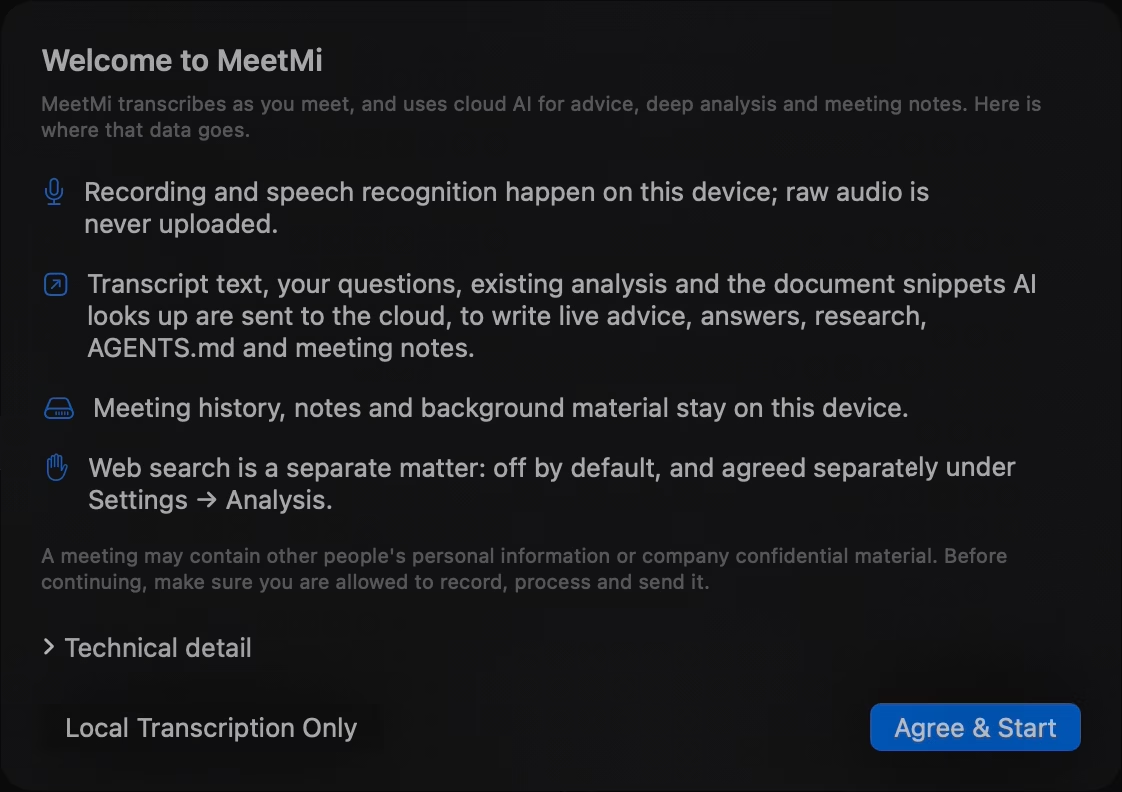
MeetMi transcribes on your device with Apple’s speech recognition. Its suggestions, analysis, answers and notes come from cloud AI, which works on text and gets nothing until you accept the data notice. Granola, by comparison, passes the audio from your microphone and system audio to its transcription provider.
More detail: offline use, translation and the cloud
If a language’s speech model isn’t on the device yet, MeetMi downloads it once, and after that transcription works without an internet connection. When the meeting is in a different language from the one MeetMi writes in (not just a different variant or script of the same language), MeetMi can also translate each line on the device with Apple’s translation and show it under the original, for language pairs Apple can translate.
On-device transcription doesn’t mean everything stays on the device. The text cloud AI works on includes the transcript, your questions and passages from your folder. Nothing goes to cloud AI until you accept the data notice, and you can choose “Local Transcription Only” instead. Audio is never sent. The privacy policy lists what goes where.
What does MeetMi add to Apple’s own speech recognition?
MeetMi’s transcript comes from Apple’s on-device speech recognition, and without a subscription that is what you get: on-device transcription and translation, with meeting history and export. The subscription adds cloud AI on top: suggestions during the meeting, the running analysis, answers to your questions and the notes.
Does it help during the meeting, or give you notes after it?
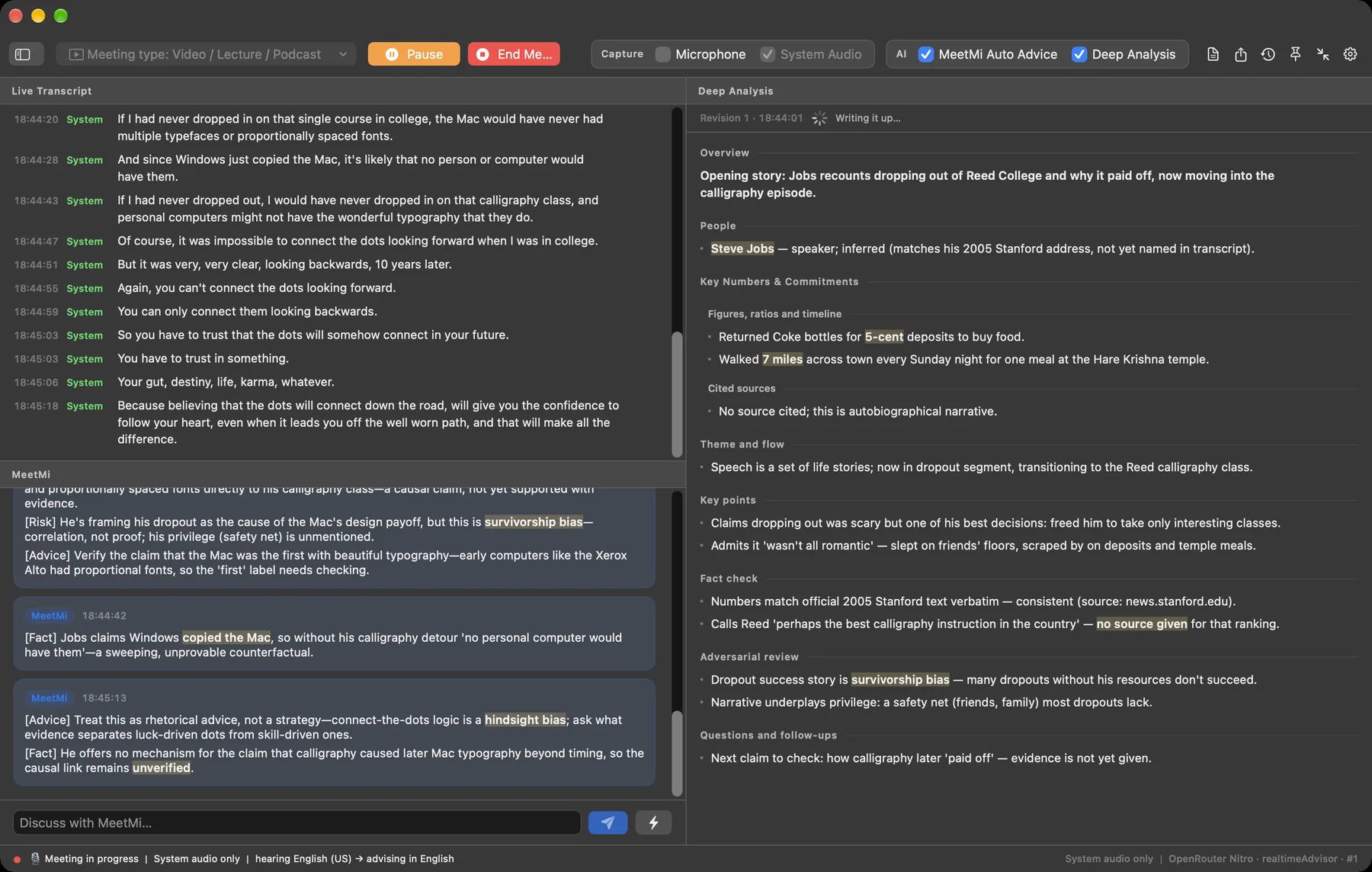
MeetMi works during the meeting: with the subscription, it posts suggestions as people talk, keeps a running analysis, answers typed questions and writes the notes when you end the meeting. Fireflies’ Live Assist and Otter’s AI Chat also help during a meeting.
More detail: cards, notes, Live Assist and AI Chat
MeetMi posts short cards, at most one every 20 seconds by default, each with one to four points tagged Fact, Advice, Risk or Action. In the background, MeetMi keeps an analysis of the people named, the numbers and the commitments, and revises it every 3 minutes by default. You can type a question at any point and get an answer based on what has been said so far. If you point MeetMi at a folder of briefs, contracts or your own notes from earlier meetings, the analysis, the notes and most answers check that material, and the live suggestions pick up what the analysis found there.
When you end the meeting, if you’re subscribed with credit left, have accepted the data notice and enough was said, MeetMi writes the notes with cloud AI: a one-line title, then Overview, Discussion, Decisions and Action Items. Without cloud AI, the meeting is still saved to your history, just without notes. You can export the notes, the analysis and the transcript as Markdown or plain text.
MeetMi isn’t the only tool that helps during a meeting. Fireflies’ Live Assist shows AI suggestions and instant answers in one panel during the meeting; outside the Fireflies desktop app and Chrome extension, it needs the Fireflies bot in the call. Otter’s AI Chat answers questions you ask during a live meeting.
Do you need an account?
MeetMi has no account and no sign-in: the App Store subscription is the only thing you buy, and MeetMi’s servers never receive your Apple ID or email. The trade-off: meeting history stays on each device, with no sync between Mac and iPhone and no team workspace. The other three all use accounts.
More detail: sharing notes, and the others’ sign-in
Without a subscription, you can still transcribe and translate on your device, keep your meeting history and export it. The subscription adds the cloud AI: suggestions, analysis, answers and notes. You share notes by exporting them.
Otter’s apps ask you to sign in to an Otter account, where you can join or create a Workspace. Fireflies and Granola sign you in with a Google or Microsoft account, and Granola has no other sign-in option.
Does it name the speakers?
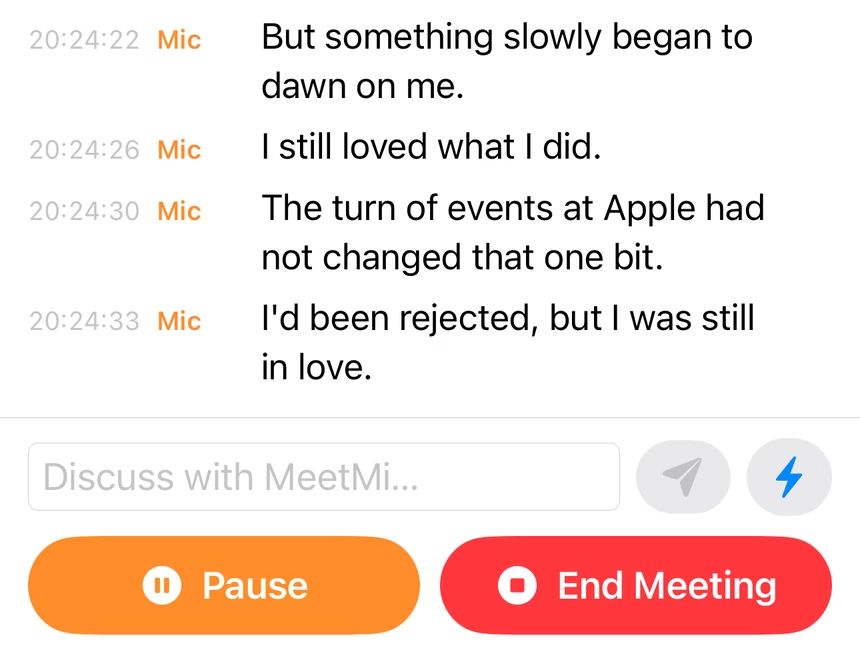
MeetMi doesn’t identify speakers: each transcript line is tagged only by where the sound came from, Mic or System.
More detail: how Otter, Fireflies and Granola label speakers
The people in MeetMi’s analysis are the ones named aloud or in your folder, not recognized by voice.
Otter tags speakers automatically from voice profiles it learns in your account, mostly after the recording stops, and its Notetaker tags Zoom speakers live by participant name. Fireflies transcripts have speaker labels and can fall back to generic ones such as Speaker 1 and Speaker 2. Granola labels speakers by display name in Google Meet, Zoom and Microsoft Teams calls on Mac and Windows, and its mobile app (iPhone and Android) can tell different speakers apart in face-to-face meetings. Where speaker tags aren’t available or turned on, its transcript shows Me and Them, for your microphone and your system audio.
MeetMi, Otter, Fireflies and Granola side by side
| Question | MeetMi | Otter | Fireflies | Granola |
|---|---|---|---|---|
| Does a bot join the call? | No | Optional; the desktop app records without one | Optional; by default it joins calendar meetings | No |
| Is the audio kept? | No, only the text | Yes, with playback and MP3 export | Yes for meetings the bot joins; not in bot-free desktop mode | No |
| Does it name speakers? | No; lines say Mic or System | Yes | Yes; generic Speaker 1, Speaker 2 when it has no names | By name in Google Meet, Zoom and Teams calls on Mac and Windows; the mobile app tells speakers apart in person; where tags aren’t available, Me and Them |
| Do you need an account? | No | Yes, an Otter account | Yes, Google or Microsoft sign-in | Yes, Google or Microsoft sign-in |
| Where does it run? | Mac with Apple silicon (macOS 26 or later) and iPhone (iOS 26 or later) | Mac, Windows, iOS, Android and a web browser | Mac, Windows, iOS, Android and a Chrome extension | Mac, Windows, iOS and Android |
| Is there a free plan? | Yes, without the AI: on-device transcription, translation, history and export | Yes, Basic: 300 transcription minutes a month | Yes, Free: limited AI summaries, 400 minutes of storage | Yes, Basic: AI meeting notes, limited meeting history |
From each company’s website, read on 26 September 2026; products change, so check their pages for current details:
- Otter: Notetaker overview, bot-free desktop app, desktop app help, mobile app, system requirements, pricing, free plan limits, audio export, speaker identification, AI Chat
- Fireflies: creating an account, desktop app, recording without a bot, free plan, downloading recordings, pricing, what Fireflies is, speaker labels, Live Assist
- Granola: transcription, consent and audio storage, setting up Granola, pricing
When MeetMi is a good fit
As an alternative to Otter, Fireflies or Granola, MeetMi fits when:
- You want help while the meeting is happening, not only notes at the end.
- You don’t want a bot in the call.
- You don’t want your audio kept.
- You’d rather not create an account.
- You prepare with a folder of material. It feeds the analysis, the answers and the notes.
- You listen in one language and want to read in another. 13 transcription options, 10 writing languages.
- You meet in the room with your iPhone. It keeps transcribing with the screen locked.
- You follow lectures, talks or videos. The Video / Lecture / Podcast type adds a fact check and an adversarial review.
More detail: how MeetMi covers each case
- No bot, no audio, no account: on a Mac, MeetMi listens to what the Mac itself plays, so nothing is added to the meeting. It transcribes on your device and keeps only the text. There is nothing to sign up for; the App Store subscription is the only thing you buy.
- Folder material can be briefs, contracts or your own notes from earlier meetings.
- Languages: MeetMi offers 13 transcription options covering 10 languages, and writes its suggestions, analysis and notes in whichever of its 10 writing languages you pick. Up to Mac 1.0.1 and iPhone 1.0, a new install writes in Simplified Chinese; from Mac 1.0.2 and iPhone 1.0.1 it starts on “Follow System”: English, or Simplified Chinese when that is the device’s first language. Change it under Settings → Meeting & Language → “MeetMi writes in” (on iPhone, the Meeting tab).
- Mac and iPhone: one subscription covers both when they use the same Apple Account.
- Lectures, talks and videos: the Video / Lecture / Podcast meeting type adds two sections to the analysis: a fact check of the speaker’s numbers and claims, and an adversarial review that argues the other side.
How MeetMi works walks through each step; Ways to use MeetMi covers the meeting types and situations.
When another tool is the better pick
- You need speaker names in the transcript. Otter and Fireflies label speakers, and Granola names them in Google Meet, Zoom and Teams calls on Mac and Windows.
- You use Windows, Android or a web browser. Otter, Fireflies and Granola all have apps for Windows and Android.
- You want a bot that joins on its own from your calendar. Otter’s and Fireflies’ Notetakers can.
- You want audio recordings to replay or download. Otter offers playback and MP3 export.
- You want meeting history in an account, synced across devices or shared with a team. Otter lets you join or create a Workspace.
- Your meetings are in a language MeetMi doesn’t offer. Fireflies says it supports more than 100 languages.
- You want AI notes without paying. Fireflies and Granola have free plans with limits; MeetMi’s AI needs the subscription.
More detail: speakers, platforms, calendars, languages and price
- Speaker names: MeetMi only tags each line Mic or System. Granola’s mobile app tells speakers apart in face-to-face meetings.
- Platforms: MeetMi runs only on Mac and iPhone. Otter also works in a web browser, while Fireflies has a Chrome extension.
- Calendars: MeetMi starts only when you press Start Meeting or continue a past meeting, and it doesn’t connect to a calendar. Otter’s and Fireflies’ Notetakers can join calendar meetings for you.
- Recordings: MeetMi keeps no audio. Fireflies lets you download recordings on its Pro plans and above.
- Shared history: MeetMi keeps history on each device, with no sync between Mac and iPhone. Fireflies can send meeting recaps to everyone on the invite.
- Languages: MeetMi transcribes each meeting in one language, from its 13 options.
- Free plans: Fireflies’ Free plan lists limited AI summaries, and Granola’s Basic plan includes AI meeting notes with limited meeting history. Otter also has a free Basic plan, with 300 transcription minutes a month. MeetMi’s on-device transcription works without a subscription, but its suggestions, analysis and notes need the subscription: $9.99 a month in the United States (the App Store shows your local price), with a one-week free trial for new subscribers.