
What's new in MeetMi
Updated
MeetMi is an AI meeting assistant for Mac and iPhone: it transcribes your meeting on your device and gives you advice while the meeting is still going. MeetMi 1.0.1 is out for Mac and the App Store listing is now called “MeetMi: AI Meeting Notes”; MeetMi 1.0.1 for iPhone and 1.0.2 for Mac are in App Review.
Updates come through the App Store, like your other apps. For how MeetMi works today, see How MeetMi works.
| Date | What changed |
|---|---|
| 27 September 2026 (Australian time) | MeetMi 1.0.2 for Mac submitted to App Review; MeetMi 1.0.1 for iPhone resubmitted with changes |
| 27 September 2026 (Australian time) | MeetMi 1.0.1 for Mac released, with the new App Store name |
| 26 September 2026 (Australian time) | MeetMi 1.0.1 for Mac and iPhone submitted to App Review |
| 26 September 2026 | The MeetMi website moved to meetmi.ai |
| 25 September 2026 | MeetMi 1.0 for iPhone released on the App Store |
| 5 September 2026 | MeetMi 1.0 for Mac released on the Mac App Store |
MeetMi 1.0.2 for Mac
In App Review since 27 September 2026 (Australian time).
- “Follow System”, now the default: a new option for the language MeetMi writes in. It writes in English, or in Simplified Chinese when your Mac is set to Simplified Chinese. If you were on the old default, Simplified Chinese, MeetMi now follows your Mac instead; pick a language under Settings → Meeting & Language to keep it fixed.
- Notes and exports in that language: saved meeting notes and exported files use the language MeetMi writes in for their headings, labels and file names.
- Continuing a past meeting from Meeting History now asks for your cloud-AI agreement when it’s needed, as the Continue button does.
- Privacy and support links in the app now go to meetmi.ai.
MeetMi 1.0.1 for Mac and iPhone
Released for Mac on 27 September 2026 (Australian time). The iPhone version was resubmitted the same day with more changes and is in App Review.
What’s new in MeetMi 1.0.1 on iPhone
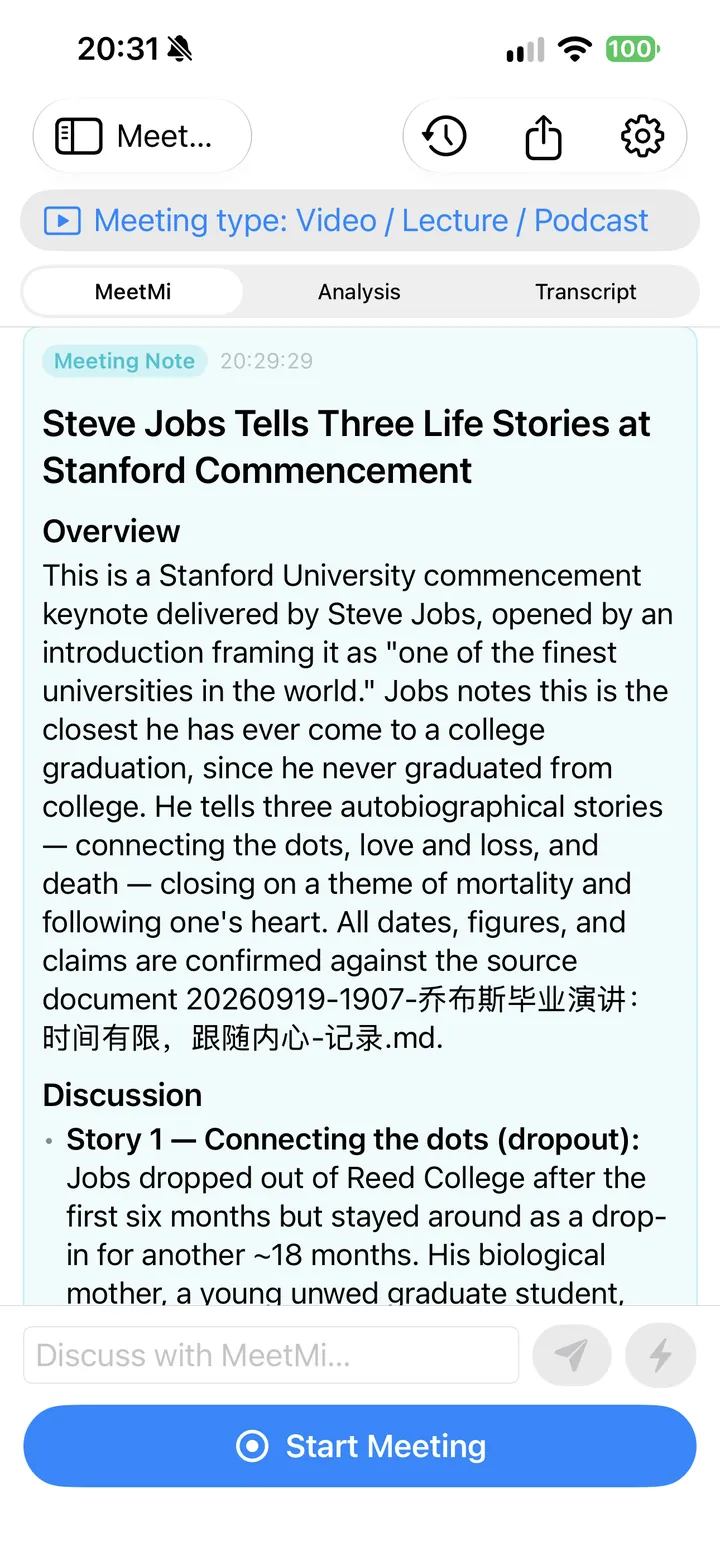
- System audio on iOS 27: MeetMi can transcribe what the phone itself is playing, such as a video.
- Not for calls: system audio can’t hear calls.
- iOS 26 and iPad stay on the microphone.
- “Follow System”, now the default for the language MeetMi writes in: English, or Simplified Chinese when your iPhone is set to Simplified Chinese.
- Notes and exports in that language: headings, labels and file names follow the language MeetMi writes in.
- Asks when a meeting starts if cloud AI still needs your agreement, for example right after you subscribe.
- Fewer dropped AI replies.
- Subscription section now says one subscription covers Mac and iPhone.
More detail: everything in version 1.0.1 for iPhone
- System audio on iOS 27. On an iPhone running iOS 27, you can set MeetMi’s Settings → Meeting → Audio capture to System audio only. MeetMi then transcribes what the phone itself is playing, such as a video or a lecture. The microphone stays the default.
- Apple’s sharing sheet at the start. Each meeting that uses system audio starts with Apple’s own sharing sheet, where you choose the entire screen. MeetMi keeps only the sound and discards the screen image as it comes in.
- Not for calls. System audio can’t hear calls. In testing, a video call came through only as silence, with no error shown.
- iOS 26 and iPad stay on the microphone. System audio needs an iPhone on iOS 27. On iOS 26, or on an iPad, MeetMi listens through the microphone as before.
- Writing language. A new “Follow System” option for the language MeetMi writes in is now the default: English, or Simplified Chinese when your iPhone is set to Simplified Chinese. If you were on the old default, Simplified Chinese, MeetMi now follows your iPhone instead; pick a language under Settings → Meeting to keep it fixed.
- Notes and exports. Saved meeting notes and exported files use the language MeetMi writes in for their headings, labels and file names.
- Cloud-AI agreement. If cloud AI still needs your agreement when a meeting starts (for example right after you subscribe), MeetMi now asks instead of leaving it off.
- Fewer dropped AI replies. When an AI reply runs too long or includes extra parts MeetMi didn’t ask for, MeetMi now keeps the usable part instead of throwing the whole reply away. A reply that runs long is trimmed, at the end of a sentence where possible.
- Subscription section. The subscription section now says that one subscription covers Mac and iPhone.
What’s new in MeetMi 1.0.1 on Mac
- Headings in new meeting notes show properly when the AI leaves out the space after the “#”.
- Fewer dropped AI replies.
- Subscription section no longer shows an error after a purchase that went through.
More detail: everything in version 1.0.1 for Mac
- Headings in meeting notes. In new meeting notes, headings the AI wrote without a space after the “#” (such as “##Decisions”) now show as proper headings: in the app, in meeting history and in exported files. Notes written before the update are not changed.
- Fewer dropped AI replies. When an AI reply runs too long or includes extra parts MeetMi didn’t ask for, MeetMi now trims it or leaves out the extras and keeps the usable part, instead of throwing away that whole batch of advice, analysis or answers to your questions.
- Subscription section. The subscription section no longer keeps showing an error after a purchase that went through, and it now says that one subscription covers Mac and iPhone.
A new name on the App Store
Since 27 September 2026 the listing is called “MeetMi: AI Meeting Notes”, with the subtitle “Live transcription and advice”. At launch it was “MeetMi”, with the subtitle “Live advice and meeting notes”. Mac and iPhone share one listing, so both show the new name; on your Home Screen and in the Dock, the app is still called MeetMi.
The MeetMi website moved to meetmi.ai
26 September 2026.
The MeetMi website moved to meetmi.ai. The old addresses on GitHub Pages send you to the same page here, so the privacy policy and support links inside the app keep working.
The privacy policy was updated the same day to describe system audio on iPhone, which comes with version 1.0.1.
MeetMi 1.0 for iPhone
25 September 2026.
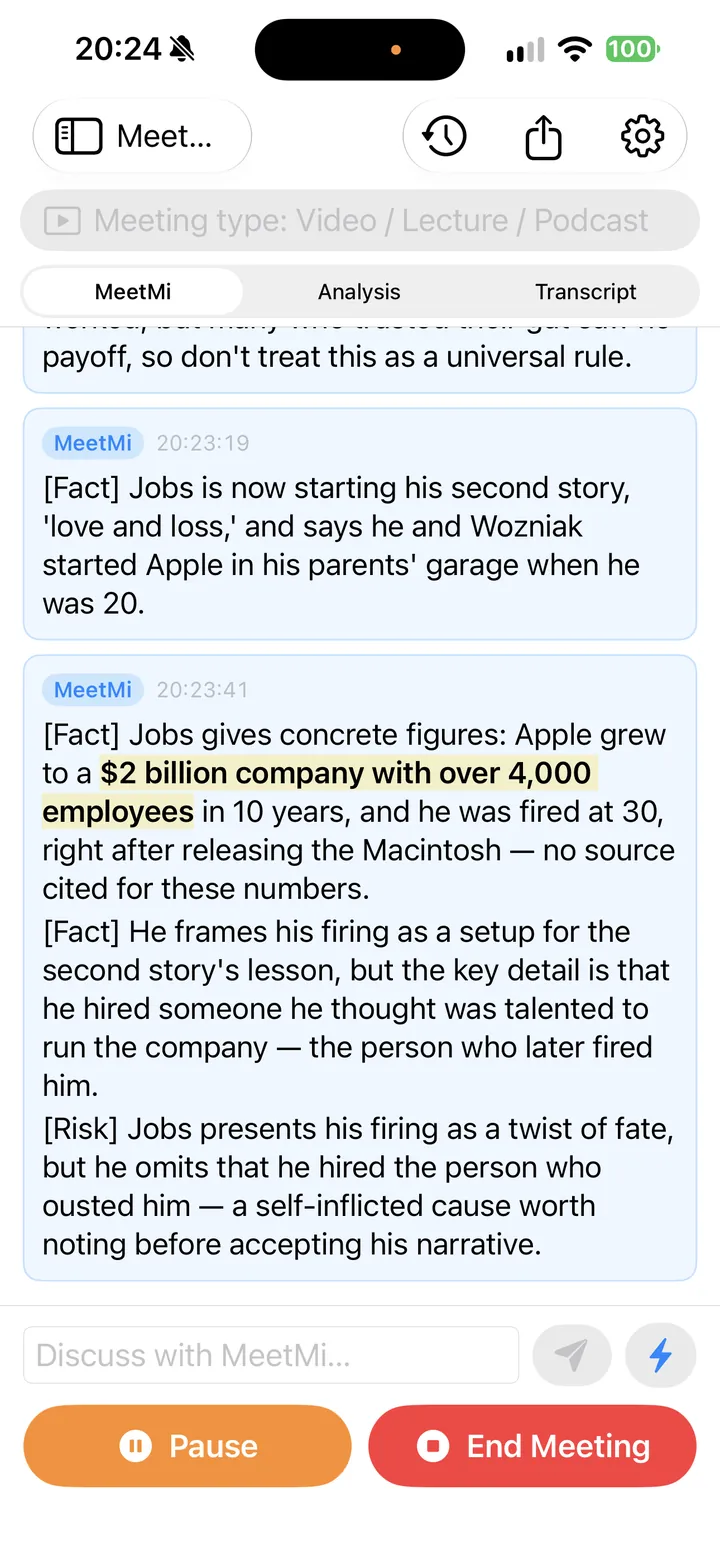
MeetMi came to iPhone, in the same App Store listing as the Mac app. The iPhone app is made for meetings in the room: put the phone on the table, and MeetMi listens through the microphone and keeps transcribing with the screen locked.
- The same live advice, background analysis and meeting notes as on the Mac.
- Version 1.0 listens through the microphone only. System audio comes with version 1.0.1, on iOS 27.
- One subscription for Mac and iPhone.

More detail: requirements, iPad, the Files app and the subscription
- You pick the folder for your material and notes in the Files app, and you can share notes straight from MeetMi.
- Requires iOS 26 or later. The app is built for iPhone. On an iPad it runs as the iPhone app, microphone only, without an iPad layout.
Same subscription as on the Mac. MeetMi on Mac and iPhone share one App Store listing and one subscription. It is designed so that, with the same Apple Account on both devices, they draw on the same credit balance. Meeting history stays on each device and is not synced between them.
MeetMi 1.0 for Mac
5 September 2026.
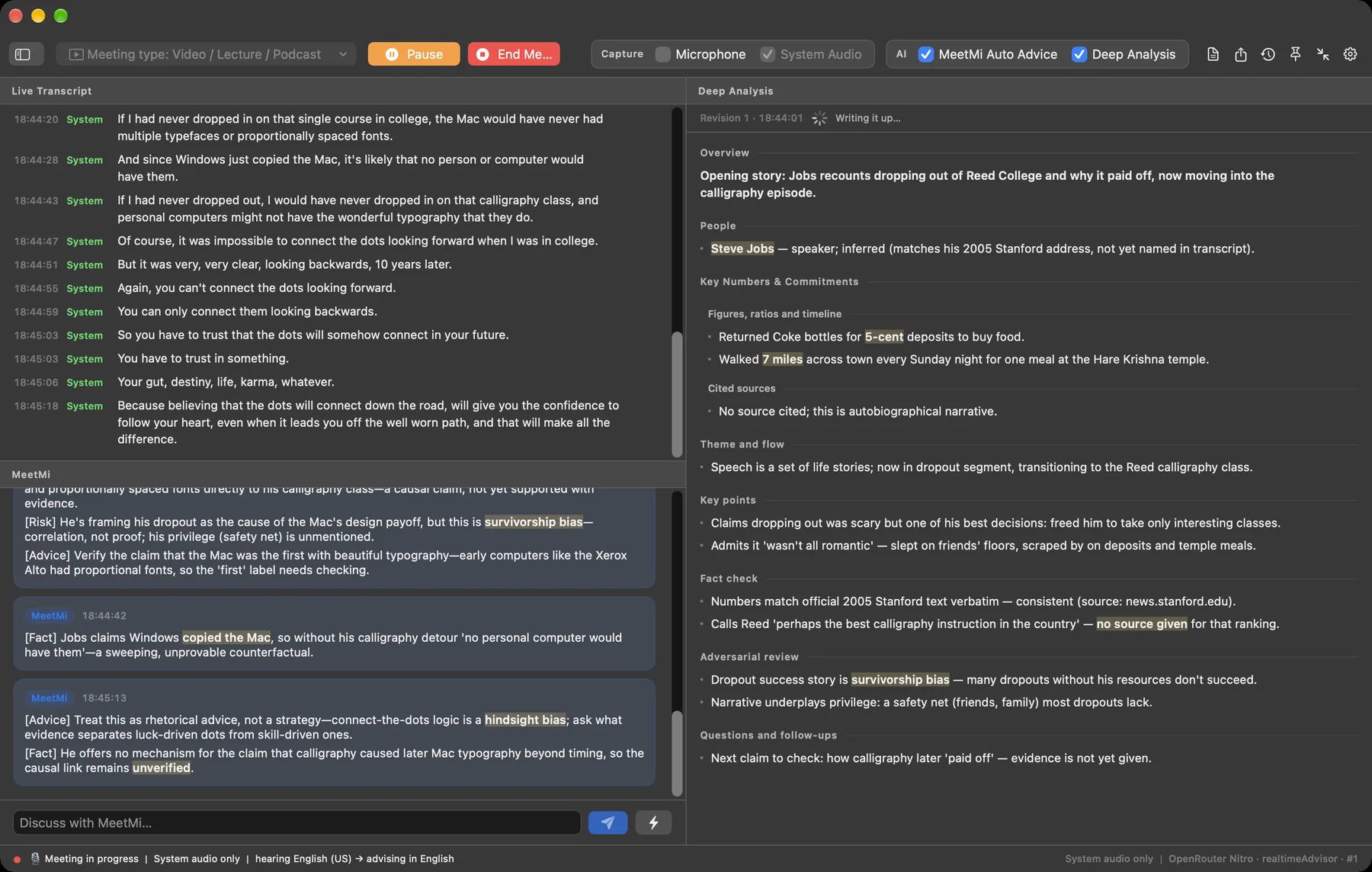
MeetMi launched on the Mac App Store: an app that listens to your meeting and helps while it is still happening.
- It hears both sides: by default, your microphone and whatever your Mac plays, from any app. No bot joins the call.
- Transcription on your Mac, with Apple’s on-device speech recognition. Raw audio is never saved and never uploaded.
- Live advice: short cards during the meeting, with points tagged Fact, Advice, Risk or Action.
- Background analysis and questions: an analysis that keeps revising itself, and questions you can type mid-meeting.
- Meeting notes, drafted from the transcript and the running analysis when you end the meeting.
- Your folder: MeetMi uses your documents for its analysis, answers and notes.
The MeetMi subscription
MeetMi is free to download, and there is one thing to buy: a monthly auto-renewing subscription through the App Store, which adds the cloud AI. Without it, MeetMi still transcribes and translates on your device.
More detail: everything in version 1.0 for Mac
- It hears both sides. By default MeetMi listens to your microphone and to whatever your Mac plays, from any app. No bot joins the call, and there is nothing to install in your meeting app (how MeetMi compares with other AI note takers). Hearing the Mac’s audio needs macOS’s Screen & System Audio Recording permission. Without it, the microphone works on its own.
- Transcription on your Mac. Apple’s on-device speech recognition turns speech into text as it arrives. Raw audio is never saved and never uploaded. You can pick from 13 transcription options covering 10 languages. Left on automatic, MeetMi only chooses among English, Mandarin and Japanese, so pick any other meeting language yourself in Settings.
- No speaker names. MeetMi does not identify who is speaking. Each transcript line is marked Mic or System, by where the sound came from.
- Live translation. The live transcript can be translated on the device into the language MeetMi writes in, for the language pairs Apple’s on-device translation supports.
- Live advice. Short advice cards arrive during the meeting. Each card holds one to four short points, tagged Fact, Advice, Risk or Action.
- Background analysis and questions. An analysis in the background keeps revising itself as the meeting goes on, and you can type questions mid-meeting. Web research is optional and needs its own consent. Live advice and meeting notes never search the web.
- Meeting notes. When you end the meeting, MeetMi drafts the notes from the transcript and the running analysis. Notes are written by cloud AI, so they need the subscription and your consent.
- Your folder. Point MeetMi at a folder of documents, and it uses them for the background analysis, its answers to your questions and the meeting notes. Each note is saved in a Meetings folder inside it.
- Export. Notes, analysis, advice and transcript export as Markdown or plain text.
- Meeting types. Eight built-in types: Team Meeting, Negotiation, Customer / Pre-sales, Town Hall, One-on-One, Retrospective, Interview, and Video / Lecture / Podcast. There is also Custom, which follows an AGENTS.md file in your folder. See ways to use MeetMi.
- Writing languages. MeetMi writes its advice, analysis and notes in 10 languages. A new install writes in Simplified Chinese until you change “MeetMi writes in” under Settings → Meeting & Language (on iPhone the tab is called Meeting).
- Interface. English or Simplified Chinese, with a short feature tour on first launch.
- Requirements. macOS 26 or later on a Mac with Apple silicon (M1 or newer).
The subscription. MeetMi is free to download, and there is one thing to buy: a monthly auto-renewing subscription through the App Store. There is no account to create. New subscribers start with a one-week free trial that includes 1,000 credits. After the trial, each monthly period includes 4,500 credits, and unused credits don’t carry over. There are no credit top-ups. See pricing for the current price.
Without a subscription, MeetMi still transcribes and translates on your device, keeps your meeting history and exports it. The subscription adds the cloud AI: live advice, analysis, answers to your questions and meeting notes.
Where it’s available. At launch, MeetMi was available in 174 countries and regions. It is not offered in mainland China.