
A Fireflies.ai alternative without the bot
Updated
MeetMi is an AI meeting assistant for Mac and iPhone that you can use instead of Fireflies.ai: no Notetaker joins your calendar meetings, the speech is transcribed on your device and the audio is never kept, there is no sign-in, and suggestions arrive while people are still talking. Fireflies is the better pick if you need speaker labels, recordings to download, team channels and integrations, more than 100 languages, or Windows, Android or Chrome.
Facts about Fireflies come from its website and help guide, read on 21 October 2026 and listed under the table. We make MeetMi and haven’t tested Fireflies.
How MeetMi differs from Fireflies
Does a bot join your meetings?
No. MeetMi listens on your own device and doesn’t connect to a calendar: it starts when you press Start Meeting. By default, Fireflies’ Notetaker joins every calendar meeting that has a web-conference link; you can change that, and its desktop app and Chrome extension record without the bot.
More detail: what MeetMi hears, and telling people
On a Mac, MeetMi hears whatever the Mac plays, whichever app it comes from, plus your microphone, so other sounds playing at the same time are transcribed too. macOS asks for its Screen & System Audio Recording permission for this; you can decline and use the microphone alone. On iPhone, MeetMi uses the microphone, which suits a meeting in the room, and keeps transcribing with the screen locked. From version 1.0.1 on iOS 27, you can switch it to system audio to transcribe what the phone plays, such as a video; system audio can’t hear calls.
Since nothing joins the call, MeetMi doesn’t appear in the participant list. Rules on recording and transcription differ by place and workplace, so tell people you’re using MeetMi when they require it.
What happens to the audio?
MeetMi never saves or uploads the audio: Apple’s speech recognition turns it into text on your device, and only the text is kept. Fireflies keeps recordings of the meetings its Notetaker joins, with video recording and downloads on its Pro plan and above; its bot-free system-audio mode saves no separate audio or video files.
More detail: what you keep instead
You can’t play a meeting back in MeetMi. You keep the transcript, the running analysis and the notes, and you can export them as Markdown or plain text at no cost. Once a language’s speech model is on the device, transcription works without an internet connection.
Cloud AI, which writes the suggestions, the analysis, the answers and the notes, works on text only, and gets nothing until you accept the data notice. You can choose “Local Transcription Only” instead. The privacy policy lists what goes where.
Does it help during the meeting?
Yes: with AI credits, MeetMi posts short suggestions as people talk, keeps a running analysis and answers questions you type. Fireflies’ Live Assist also gives real-time notes, suggestions and answers during the meeting; outside its desktop app and Chrome extension, it needs the Notetaker in the call.
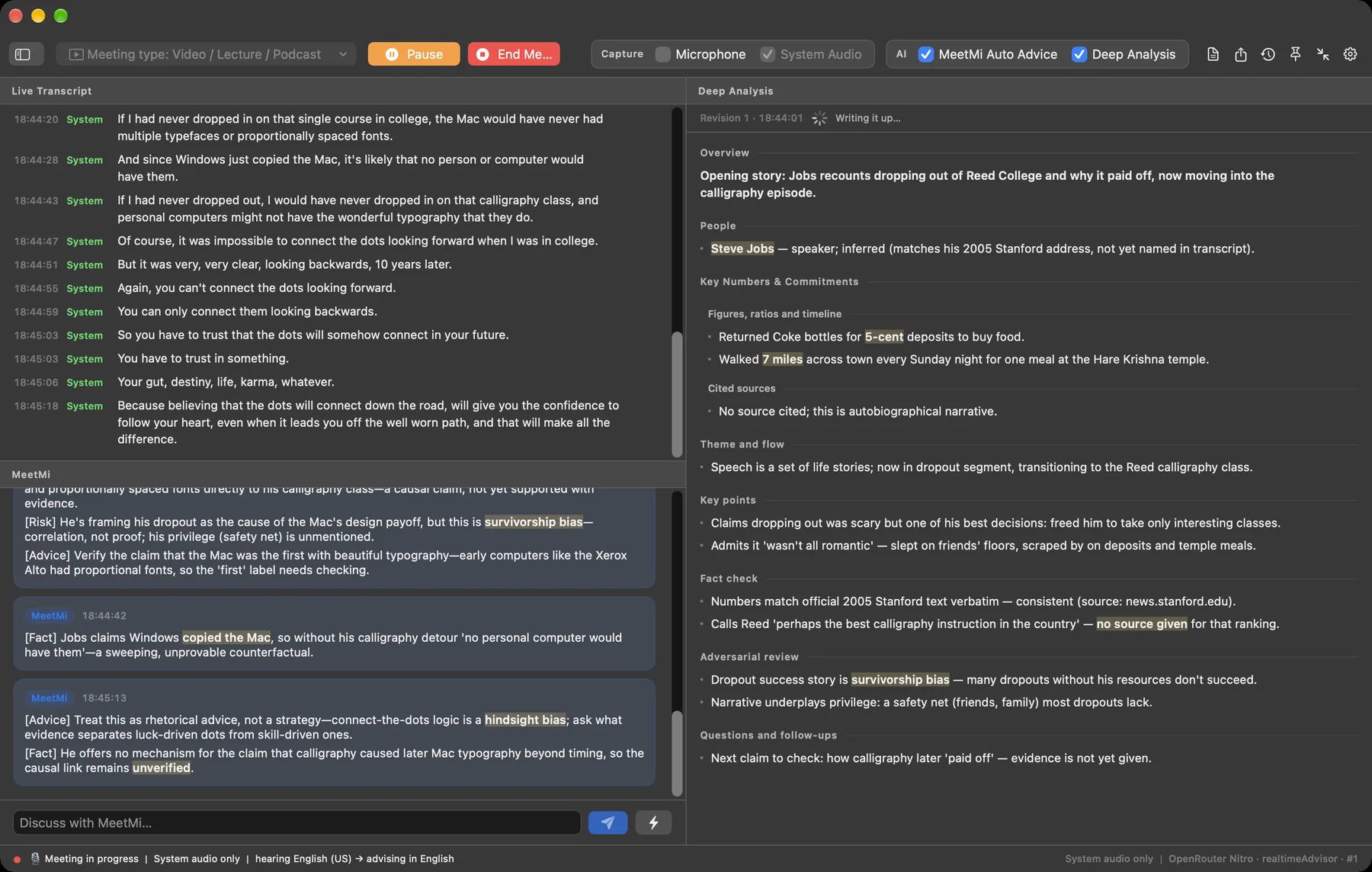
More detail: cards, analysis and notes
MeetMi posts at most one card every 20 seconds by default, each with one to four points tagged Fact, Advice, Risk or Action. The analysis keeps track of the people named, the numbers and the commitments, and is revised every 3 minutes by default. If you point MeetMi at a folder of briefs, contracts or your own notes from earlier meetings, the analysis, the notes and most answers check that material.
When you end the meeting, MeetMi writes the notes with cloud AI: a one-line title, then Overview, Discussion, Decisions and Action Items.
Do you need an account?
No. MeetMi has no sign-in: the free AI credits come with the download, and the optional App Store subscription is the only thing you buy. A Fireflies account is created with Google or Microsoft sign-in. The trade-off: MeetMi keeps meeting history on each device, with no sync between Mac and iPhone and nothing to share with a team except the files you export.
Does it name the speakers?
No. Each MeetMi transcript line is tagged Mic or System, by where the sound came from. Fireflies labels speakers in its transcripts; an uploaded file without speaker information gets generic labels such as Speaker 1 and Speaker 2.
Which languages does it transcribe?
MeetMi offers 13 transcription options covering 10 languages, one language per meeting, and writes its suggestions and notes in any of 10 languages. Fireflies lists transcription in more than 100 languages.
What does it cost?
MeetMi is free to download and transcribes on your device without using credits; from version 1.1, every Apple Account gets 250 free AI credits a week for suggestions, analysis, answers and notes. Fireflies’ Free plan lists limited AI summaries, 400 minutes of storage and 20 AI credits.
More detail: paid plans
MeetMi’s subscription adds 4,500 credits a month and web search: $9.99 a month in the United States (the App Store shows your local price), with a one-week free trial for new subscribers. One subscription covers your Mac and iPhone on the same Apple Account.
Fireflies Pro is $10 a seat a month billed annually, or $18 billed monthly, with 8,000 minutes of storage per seat, video recording and downloads.
MeetMi and Fireflies side by side
| Question | MeetMi | Fireflies |
|---|---|---|
| Does a bot join the call? | No | By default its Notetaker joins calendar meetings with a web-conference link; the desktop app and Chrome extension record without it |
| Is the audio kept? | No, only the text | Yes for meetings the Notetaker joins; not in bot-free system-audio mode |
| Help during the meeting | Suggestions as people talk, a running analysis and answers to typed questions | Live Assist: real-time notes, suggestions and answers |
| Speaker names | No; lines say Mic or System | Yes; generic Speaker 1, Speaker 2 for uploads without speaker information |
| Account | None | Google or Microsoft sign-in |
| Transcription languages | 13 options covering 10 languages | More than 100 |
| Where it runs | Mac with Apple silicon (macOS 26 or later) and iPhone (iOS 26 or later) | Mac and Windows desktop app, iOS, Android, a Chrome extension and the web |
| Free plan | 250 AI credits a week from version 1.1, plus on-device transcription, translation, history and export | Free: limited AI summaries, 400 minutes of storage, 20 AI credits |
From Fireflies’ website and help guide, read on 21 October 2026; products change, so check their pages for current details:
- Pricing: plans, storage, AI credits, downloads, languages, platforms
- Help guide: creating an account, recording without a bot, Live Assist, speaker labels
When Fireflies is the better pick
- You want every calendar meeting recorded without thinking about it. Fireflies’ Notetaker joins them for you.
- You need speaker labels, or recordings and video to download. Fireflies has both; downloads come with Pro.
- Your team works from shared meetings. Fireflies has channels, integrations and team analytics.
- Your meetings are in a language MeetMi doesn’t offer. Fireflies lists more than 100.
- You use Windows, Android or Chrome. MeetMi runs only on Mac and iPhone.
When MeetMi fits better
- You don’t want a bot in your meetings or recordings kept.
- You want help while the meeting is happening, written for you as people talk.
- You’d rather not sign in with Google or Microsoft. MeetMi has no account at all.
- You prepare with a folder of material. It feeds the analysis, the answers and the notes.
- You meet in the room with your iPhone. It keeps transcribing with the screen locked.
- You follow lectures, talks or videos. The Video / Lecture / Podcast meeting type adds a fact check and an adversarial review.
Your Fireflies meetings stay in Fireflies, and MeetMi starts with an empty history. If you keep Fireflies for some meetings, check its auto-join setting so the Notetaker stays out of the ones you take with MeetMi.
How MeetMi compares puts MeetMi, Otter, Fireflies and Granola side by side; there are also pages on switching from Otter and Granola.