
A Hedy alternative for Mac and iPhone
Updated
MeetMi and Hedy both help while the meeting is still going, neither sends a bot into the call, and both transcribe on your device by default, Hedy in its native apps. The differences are in pace and setup. MeetMi can post a short card every 20 seconds when there’s something new to say, while Hedy’s suggestions come every couple of minutes. MeetMi needs no account, while Hedy uses one, with Google or Apple sign-in in its desktop apps. Hedy is the better pick if you need Windows, Android or the web, speaker names, AI that runs entirely on your device, or a team plan.
Facts about Hedy come from its website, pricing page and help center, read on 6 November 2026 and listed under the table. We make MeetMi and haven’t tested Hedy.
How MeetMi differs from Hedy
Does anything join the call?
No, in either case. On a Mac, MeetMi hears whatever the Mac plays plus your microphone, and Hedy on Mac and Windows also mixes your microphone with the system audio. On iPhone, MeetMi uses the microphone, and on iOS 27 it can also transcribe what the phone itself plays, though not calls.
How often do suggestions come?
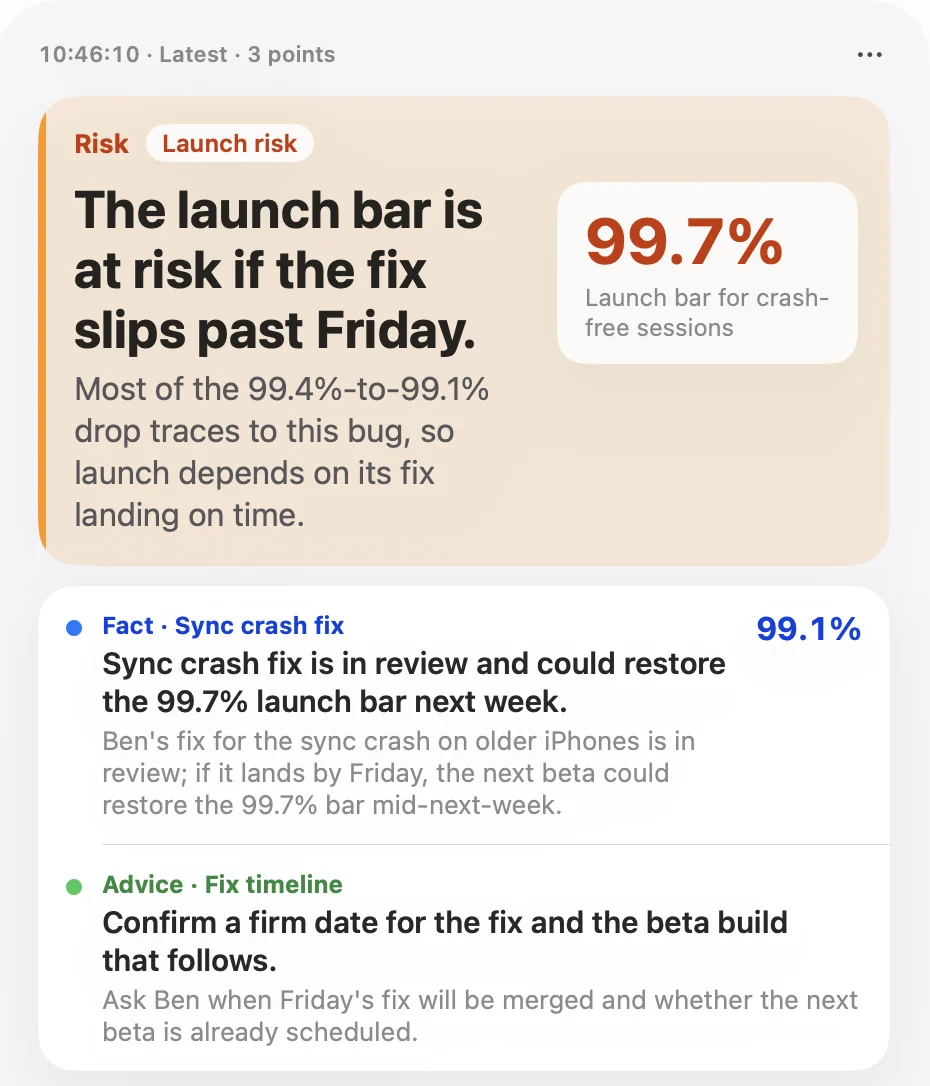
MeetMi posts at most one card every 20 seconds by default, and only when there’s something new to say. Each card has one to four short points tagged Fact, Advice, Risk or Action, with the key point set large, and you can ask for one at once with Analyze Now. Hedy’s automatic suggestions come every couple of minutes, the first after about two minutes of conversation, and a setting makes them more or less frequent. In both apps you can type a question at any time.
Is there a time limit on suggestions?
Not in MeetMi. Suggestions run for as long as the meeting does, while you have AI credits: 250 free every week, or 2,500 to 15,000 a month with a subscription. Hedy’s live suggestions stop after the first 30 minutes of a session on its free plan and after 120 minutes on Pro.
What goes to the cloud?
Both turn speech into text on your device by default, Hedy in its native apps, so the audio stays there. MeetMi sends the text to cloud AI only after you accept the data notice, and you can choose “Local Transcription Only” instead. Hedy sends the transcript to its servers for analysis by default. On capable devices, its Local AI Processing runs the summaries and suggestions on the device too. MeetMi has no such option: its suggestions, analysis and notes always come from cloud AI.
Is the audio kept?
MeetMi keeps only the text. Hedy can save a recording on the device that captured it, for playback, if you turn that on. It’s off by default.
Do you need an account?
No. MeetMi has no sign-in: the free AI credits come with the download, and the optional App Store subscription is the only thing you buy. Hedy uses an account, with Google or Apple sign-in in its desktop apps, and asks whether to sync sessions across devices when you create it. MeetMi’s meeting history syncs between your own Mac and iPhone through your iCloud.
Does it name the speakers?
No. Each MeetMi transcript line is tagged Mic or System, by where the sound came from. Hedy separates voices into numbered speakers when it transcribes on the device, and fills in a name when someone says who they are.
What does it cost?
MeetMi is free to download and transcribes on your device without using credits. Every Apple Account gets 250 free AI credits a week, shared by Mac and iPhone. The optional subscription comes in three plans, all with web search: Standard with 2,500 credits a month for $4.99, Pro with 6,000 for $9.99 and Max with 15,000 for $19.99, in the United States (the App Store shows your local price), with a one-week free trial. Hedy’s free plan covers up to 5 hours a month, and Pro is $12.99 a month, $99.99 a year or $299 once.
MeetMi and Hedy side by side
| Question | MeetMi | Hedy |
|---|---|---|
| Does a bot join the call? | No | No |
| Where is speech transcribed? | On your device | On your device by default in its native apps; cloud providers with your own API key |
| What the cloud AI gets | Text, after you accept the data notice | The transcript, unless Local AI Processing is on |
| How often suggestions come | Up to one card every 20 seconds, when there’s something new | Every couple of minutes |
| Time limit on suggestions | None; they pause only when credits run out | First 30 minutes of a session on Free, 120 minutes on Pro |
| Speaker names | No; lines say Mic or System | Numbered speakers, named when someone says who they are |
| Account | None | Yes; Google or Apple sign-in in the desktop apps |
| Where it runs | Mac with Apple silicon (macOS 26 or later) and iPhone (iOS 26 or later) | Mac, Windows, iPhone, iPad, Android, Apple Watch and the web |
| Free plan | 250 AI credits a week, plus on-device transcription, translation, history and export | Up to 5 hours a month |
From Hedy’s website, pricing page and help center, read on 6 November 2026; products change, so check their pages for current details:
- hedy.ai: platforms, no bot, privacy
- Pricing: plans, hours, limits on live suggestions
- Help center: automatic suggestions, local AI processing, speech recognition providers, speakers in transcripts, audio recordings, capturing virtual meetings, system requirements
When Hedy is the better pick
- You use Windows, Android, an iPad or the web. MeetMi runs only on Mac and iPhone.
- You need speaker names.
- You want the AI to run on your device too, not only the transcription.
- You want to play back the audio after the meeting.
- You work as a team or connect your notes to other tools. Hedy has team plans, an API and Zapier.
- You’d rather pay once. Hedy Pro has a lifetime price.
When MeetMi fits better
- You want a nudge as each point comes up, not every couple of minutes. How the live advice works.
- Your meetings run long. MeetMi’s suggestions don’t stop after a set number of minutes.
- You don’t want an account.
- You keep briefs, contracts or price lists in a folder. MeetMi’s analysis looks things up in them, and the next cards use what it finds.
- You want advice tuned to the kind of meeting. MeetMi has eight meeting types, from negotiations to interviews, plus your own
AGENTS.md. - You listen in one language and want to read in another. MeetMi can translate each line on your device and writes in any of 10 languages.
Your Hedy sessions stay in Hedy, and MeetMi starts with an empty history. To try it, download MeetMi and press Start Meeting when your next meeting begins.
How MeetMi compares puts MeetMi, Otter, Fireflies and Granola side by side; there are also pages on switching from Granola, Otter and Fireflies.